A data centre from the classifieds
Which used parts I bought, why I took 256 GB of slower memory, and why the old PCIe 3.0 link does not matter yet.
In the first part of this series I worked out that a local model like Qwen3.8-Flash-Next waits mostly on memory bandwidth, and that the cheapest way to get a lot of it is a used server with eight memory channels. That settled the kind of machine. It left the actual shopping, and with it three decisions that cost or save real money: where to buy, how much memory to put in, and whether the old PCIe 3.0 link to the graphics card would hold the whole thing back.
Buying where I could test
Second-generation EPYC servers from 2019 and 2020 are what data centres are retiring now, and the parts turn up in two places: dealers who ship bundles from China, and private sellers on the classifieds. A comparable bundle from China, a Supermicro board with an EPYC 7302 or 7402, cost about €510 plus about €100 import VAT in October, without a cooler. It would also have arrived untested, and a server board that does not start is hard to send back across a continent.
I bought from private sellers in Germany instead. The main bundle came from a seller in Fürth, a few kilometres from Nuremberg, with an EPYC 7352 with 24 cores, a Gigabyte MZ01-CE2 board and a cooler, for €470 all in. Before we agreed, the seller sent me a photo of the setup screen showing the board, its firmware version and the CPU it had detected, and I collected the bundle in person, with a test start at the seller’s. The memory came from a private seller elsewhere in Germany. I paid with PayPal Goods and Services, which refunds the buyer if the goods do not arrive as described, and the seller shipped the eight sticks insured, in two packages. The case came from a third seller.
| Part | What I bought |
|---|---|
| CPU, board, cooler | AMD EPYC 7352 (24 cores), Gigabyte MZ01-CE2, the server cooler, one used bundle, €470 |
| Memory | 8 × 32 GB SK hynix DDR4-2400, registered ECC, €80 per stick |
| Case | NZXT H5 Flow, used, €50 |
| Cooling | a fan hub, two 140 mm and two 120 mm case fans |
| Power | a 1200 W power supply |
| From my desktop | the Radeon AI PRO R9700 (32 GB) and a 512 GB NVMe SSD |
All in, graphics card included, that came to €3,060.
The board’s identity record later told me where it had lived before: it came out of a Gigabyte G431-MM1, a rack server with its own fan board. The firmware still expects that fan board, which is the subject of part 4. Used server parts are cheap partly because they were made for a specific chassis, and some of that chassis stays behind in the firmware.
How much memory
The memory decision was the one I thought about longest, because this board has exactly one slot per memory channel. Bandwidth only adds up when every channel has a stick, so with eight slots and eight channels the capacity comes in fixed steps: eight 16 GB sticks for 128 GB, or eight 32 GB sticks for 256 GB. There is no adding two more sticks later. Going from 128 to 256 GB would have meant selling all eight and buying eight new ones.
128 GB would have held the model I started with, the 94 GB UD-IQ4_XS build of Flash-Next: Strata’s documentation puts it at about 72 GB of RAM when its n-gram table stays on the SSD. The build I run today does not fit.
Strata splits the model between the graphics card and RAM. The card holds the parts that every token passes through, plus a copy of the experts used most often, and it is full: the engine occupies 31.7 of its 31.9 GiB, 20 GiB of that for the copied experts. While it writes, the engine’s log shows 72 to 84 percent of the experts a token needs already on the card. All the experts also sit in RAM, and the CPU computes the ones the card does not hold.
In RAM, today’s UD-Q4_K_XL build occupies another 135 GiB: 72 GiB of experts, 27 GiB of n-gram table, which I keep in RAM instead of on the SSD, and 36 GiB that the engine allocates on top. The next models I care about need 102 to 177 GiB of RAM for their experts alone.
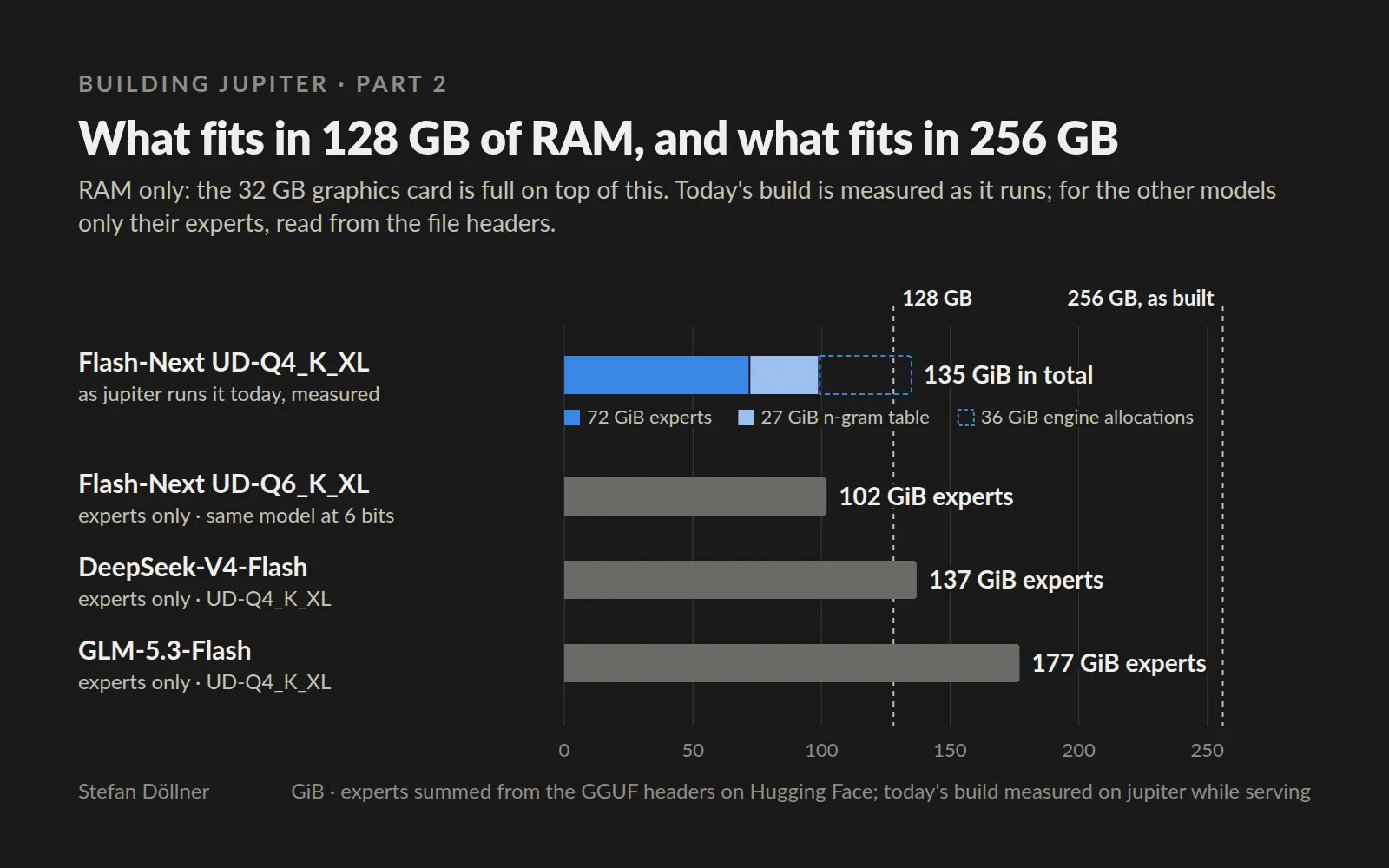
fig. 1 — RAM only; the graphics card is full on top of this. Today’s build: everything the service occupies in RAM while serving, measured on jupiter. The other three: their experts only, summed from each file’s header on Hugging Face; running them takes more.
With 256 GB, trying a 6-bit version of the same model, or another large model of this generation, means editing a configuration file. Of the 256 GB, Linux reports 247 GiB as usable.
How fast the memory
The listing I first planned around offered DDR4-2666. I bought DDR4-2400, because it was cheaper.
On paper that costs a tenth of the bandwidth: eight channels give 171 GB/s at 2666 and 154 GB/s at 2400. Writing tokens is the part of the work that follows memory bandwidth, so in the worst case jupiter writes about a tenth slower than it could, roughly 6 tokens per second at 60. Reading prompts runs mostly on the graphics card and hardly depends on the memory speed at all. Faster DDR4-3200 sticks cost about twice as much per stick in the listings I saw.
I gave up at most a tenth of one of my two speed figures in exchange for twice the capacity at a price I was willing to pay. Run the other way, the same budget would have bought 128 GB of faster memory and a ceiling I would already be hitting. One thing I have not done yet is measure jupiter’s real memory bandwidth, so the tenth is the figure on paper, and the measurement is still on my list.
The sticks are registered ECC memory, so the board corrects single-bit errors and logs larger ones. For a machine that holds a model in RAM for weeks at a time, that is worth having, and on the used market it costs nothing extra, because registered server memory is almost always ECC.
PCIe 3.0, measured before paying to avoid it
The weak spot on paper is the link to the graphics card. Every card slot on this board is PCIe 3.0. The setup menu has a “Link Speed” option that offers Gen 4, which looked like a free upgrade until I read the manual: that option belongs to the non-transparent bridge used to connect two systems, and the card slots stay at Gen 3 whatever it says.
What the engine measures over that link is 14.2 GB/s from the host to the card. That is about what the same card had in my desktop, where it sat in a slot wired as PCIe 5.0 with four lanes. Whether that matters depends on what crosses the link.
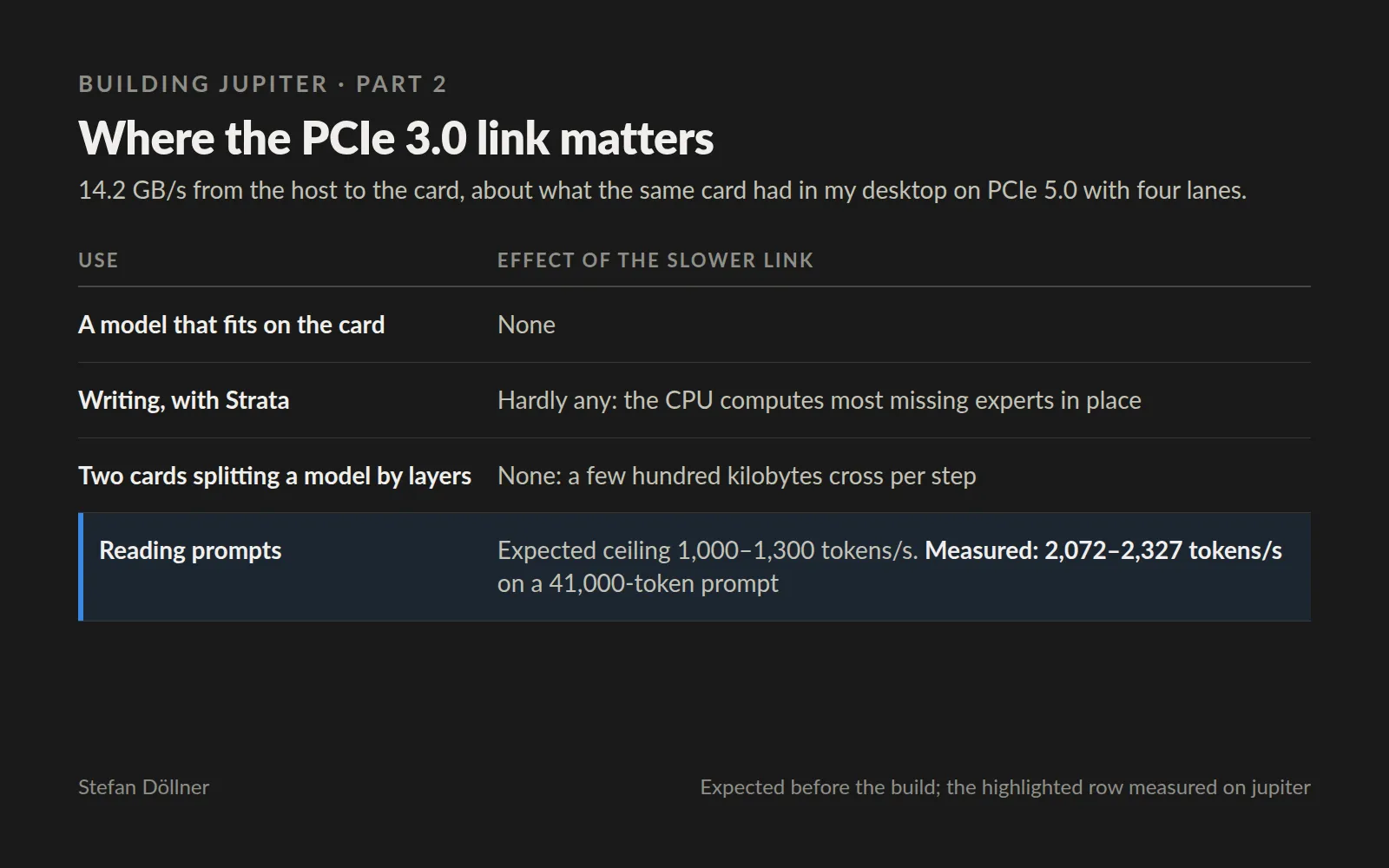
fig. 2 — what I expected before the build, and the one row I could measure
The only case that worried me was reading prompts, because the engine streams the experts the card does not hold across the link to compute them there. A measurement from another user, an older NVIDIA card on PCIe 3.0, suggested a ceiling of about 1,000 to 1,300 tokens per second. jupiter reads 41,000-token prompts at 2,072 to 2,327 tokens per second, so whatever the ceiling is, the current setup has not reached it.
The link is not free everywhere. A short addition to a long agent conversation still makes the engine stream every expert the card does not hold, and on the larger 6-bit build such steps took 7.3 to 7.6 seconds even when they added only 1,500 to 5,300 tokens. The engine has settings for exactly that case, which I have not tested yet.
The upgrade path, if the link ever becomes the limit, is a third-generation EPYC board with PCIe 4.0. In October a suitable board cost about €700 to €780 and a matching CPU €250 to €350, and the memory, case, cards and SSD would all carry over. Before that comes a second R9700, which would move the experts onto the cards and take the link out of the question. The board has four full-width slots, spaced so that two double-width cards fit side by side.
What carries over
Buying used hardware is mostly a question of what protects you if a part turns out to be bad. For the board and the CPU, that was a photo of the setup screen and a start-up in front of me. For the memory, which I could not test before paying, it was buyer protection and insured shipping.
When a platform grows only in fixed steps, size it for the next step as well as for today, because the step after a wrong choice is a full replacement. Here that meant twice the memory at a slower speed, which is a trade I would make again.
And before paying to remove a limit, measure whether you have hit it. PCIe 3.0 looked like the obvious weakness of a 2019 server, and the measurement says it does not cost anything yet for what I run.
Next week: why the new server rebooted six times at every start, and the piece of brass that caused it.