Buy for the bottleneck
A local AI server from used parts, sized for what the work actually waits on.
I wanted a local AI that I could tinker with and, ideally, trust with two jobs: administering my servers and working with private data. When I started, the model I wanted for that did not fit on my desktop. Three weeks later it was running on a used 24-core server in my basement, writing 55 to 69 tokens per second for a single session and serving four sessions at once. In this series I describe how I got there, what I measured along the way, and where the estimates I wrote down beforehand turned out to be wrong.
Why local at all
I still write the bulk of my code with coding agents on cloud subscriptions, and for that work they are hard to beat. A local model earns its place somewhere else. It is private, so I can give it the most sensitive data I have without sending that data to anyone. It is unrestricted, because no provider’s usage limits or policies decide what I can ask of it. And it is always on: when Anthropic’s servers are down, or my internet connection is, the model I work with is still there.
The problem
Until then the hardware for this was my desktop: a Ryzen 7 7800X3D with 32 GB of RAM and two AMD graphics cards, the newer of which, a Radeon AI PRO R9700, has 32 GB of memory of its own. It ran Qwen3.8-27B well.
Then I started using Qwen3.8-Flash-Next, and for my work its answers were clearly better. The catch is its size: 125 billion parameters, and the 4-bit version I wanted is a 94 GB download. Once the operating system and the desktop had taken their share, my machine had about 30 GB of RAM to spare, plus the 32 GB on the card, so the model simply did not fit.
The obvious answer
The cheapest fix would have been more RAM in the desktop, since two 48 GB sticks would have been enough to load the model. People running a similar setup reported 20 to 25 tokens per second while writing, falling as the conversation grows, and 250 to 320 tokens per second while reading a prompt.
That second number decides whether agents are usable at all. An agent working on a server or a codebase often sends 40,000 tokens of files, logs and history before each answer, and at 300 tokens per second the model spends more than two minutes reading before it writes its first word. Repeat that for every step of a task and the afternoon is gone.
What the work actually waits on
Flash-Next is a mixture-of-experts model. It consists of 512 small expert networks, and each token passes through only 11 of them, so only about 6 billion of the 125 billion parameters do any work on a given token.
Besides the experts, the model carries an unusual extra part: an n-gram table with 20 million entries for common two- and three-token sequences, 51 billion parameters on its own and about 27 GB in the 4-bit files. The model looks entries up in it rather than computing with it, so the table can stay on the SSD and be read on demand, which is how people squeeze the model into 32 GB of RAM. With enough memory it can simply live in RAM alongside everything else.
That changes the question. Because the card cannot hold the whole model, most of the experts live in system RAM, and the inference engine I use, Strata, lets the CPU compute them where they are instead of copying them over to the card. The limit is then how fast the CPU can read its own memory.
My desktop has two memory channels of DDR5-6000, which comes to 96 GB/s on paper. A second-generation AMD EPYC server has eight channels of DDR4, and even with older, slower modules those eight channels give 137 GB/s on paper at 2133 MT/s and 171 GB/s at 2666 MT/s. In practice these chips reach roughly 60 to 75 percent of the paper figure, but so does every platform. Server hardware from a few years ago was built for exactly this kind of load, and because data centres retire it in bulk, it is cheap on the used market.
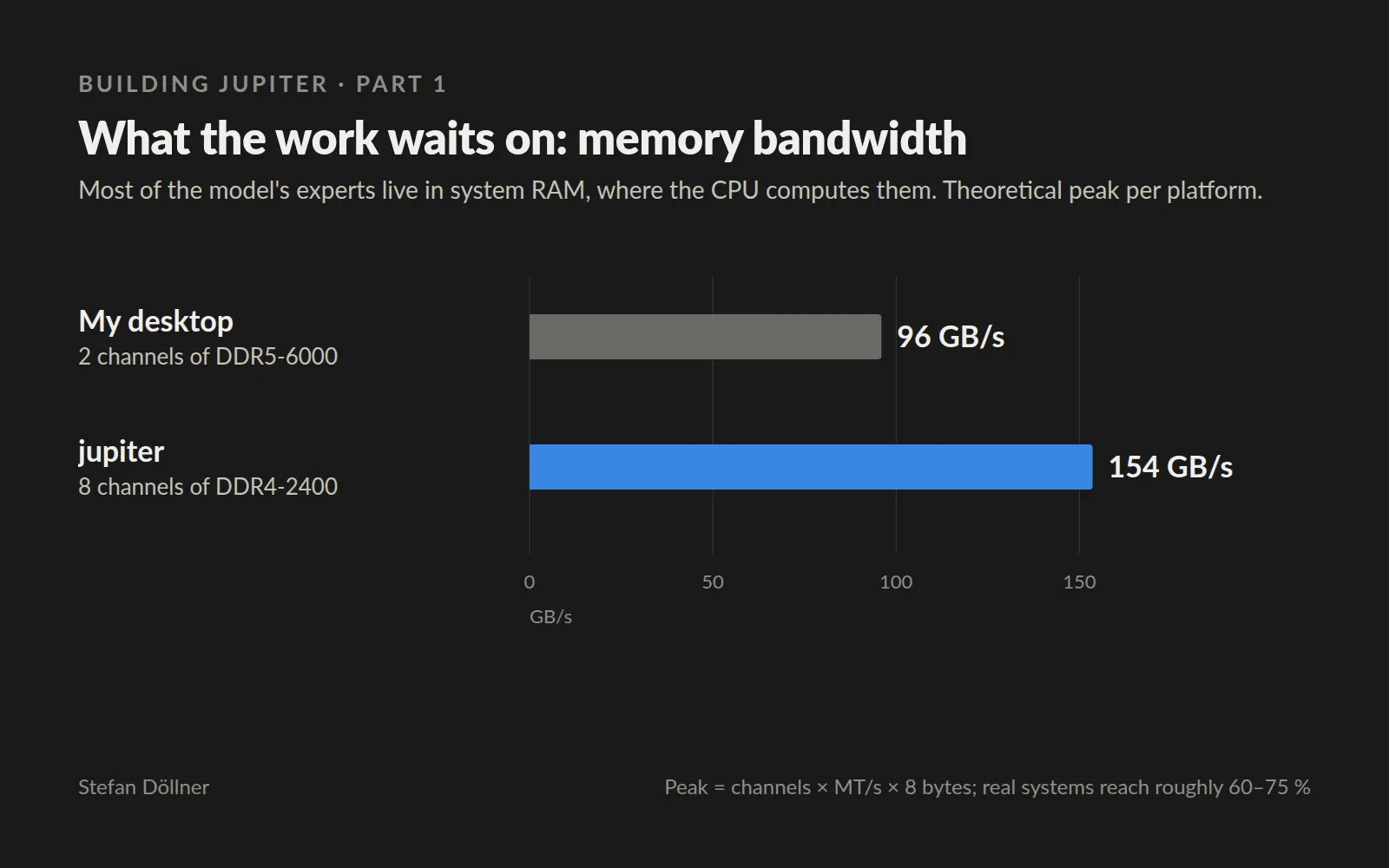
fig. 1 — peak bandwidth = channels × transfer rate × 8 bytes; real systems reach roughly 60–75 percent of it
The decision
So I bought for the bottleneck. A private seller offered an EPYC 7352 with 24 cores together with a Gigabyte server board and a cooler, another sold me eight 32 GB sticks of registered ECC memory at €80 each, and a desktop case cost €50. Add a fan controller, two 140 mm and two 120 mm case fans, a 1200 W power supply, and the R9700 and the SSD from my desktop, and the whole server came to €3,060, graphics card included.
The server came with a second goal: no model would run on the desktop any more. Agents and editors on any machine reach the models over the network, and long agent sessions live on the server, so they keep running when my desktop is switched off. I built it over two days and named it jupiter.
Estimates against measurements
Before buying anything I wrote down what I expected, and my notes still hold those estimates, struck through and dated, next to what I later measured.
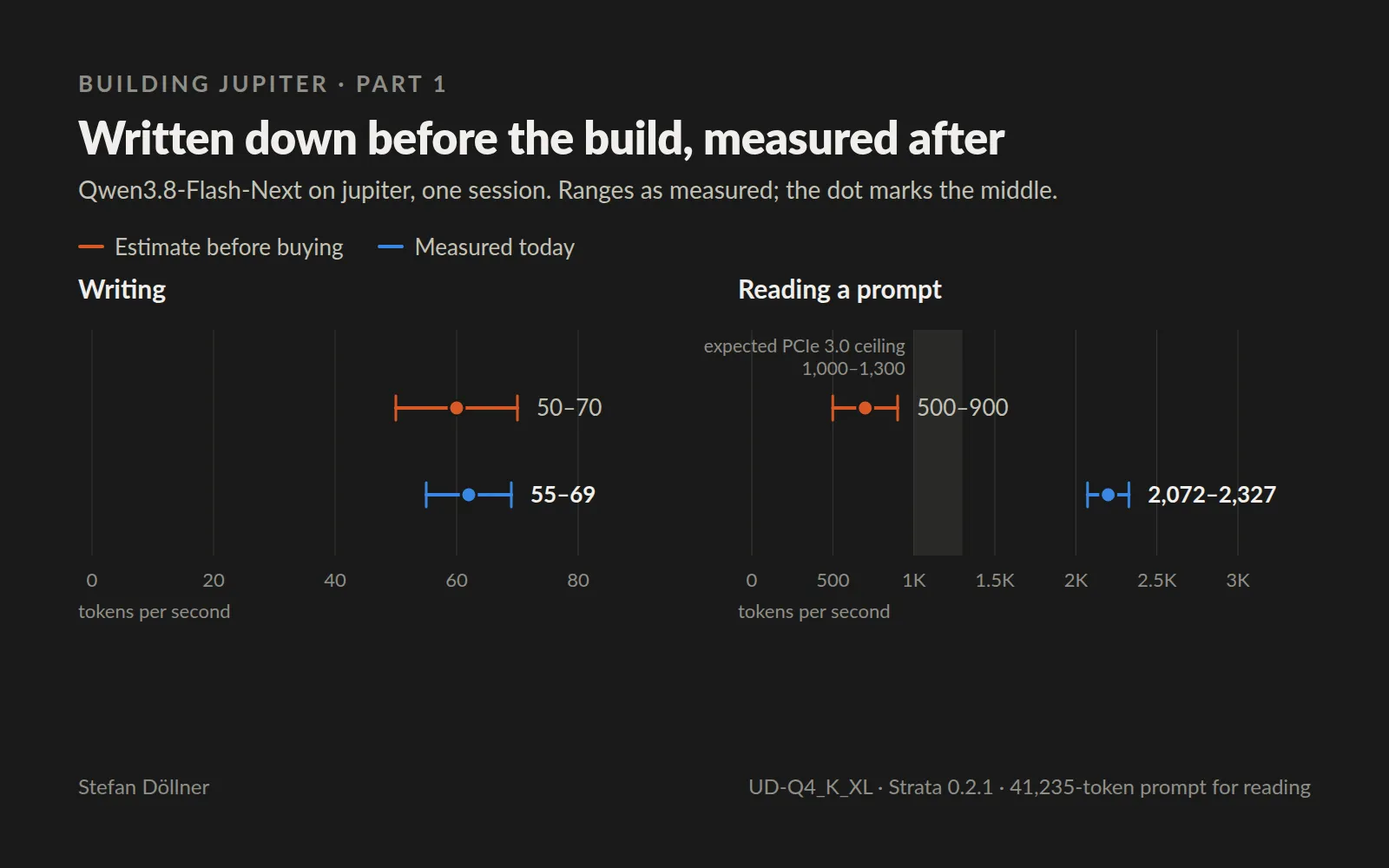
fig. 2 — written down before the build, measured after; ranges as measured, the dot marks the middle
The writing estimate held up, but the prompt estimate was too low by a factor of three. I had based it on community measurements from a different AMD card and an older version of the engine, and on a measurement suggesting that the server’s older PCIe 3.0 link would set a ceiling. Both assumptions were wrong, and part of the gap also comes from my own tuning during the first three days, which part 5 of this series covers.
Being wrong in my favour is still being wrong, but the written estimate earned its place anyway. Because I had put a number on the PCIe ceiling, I knew exactly what to check, and the measurement settled a question that was worth real money: a newer server board, bought only for its faster link, would gain me nothing today.
Long contexts hold up as well. With a 512,000-token setting the model read a text of 499,270 tokens at 2,058 tokens per second, in about four minutes, and answered all six questions about the five facts hidden in it. The everyday setting stays at 262,000 tokens.
These figures are for what runs today: the 111 GB UD-Q4_K_XL build, with all of it, n-gram table included, held in RAM, where the service occupies about 135 GiB of the 256 GB. In the first days I ran the smaller 94 GB UD-IQ4_XS build, which read prompts about a tenth faster; why I switched is a story for part 6.
What carries over
Before spending money on speed, it pays to find out which resource the work is actually waiting on. Here it was memory bandwidth rather than the graphics card or the core count, and the hardware that does best at it turned out to be old, used and cheap. The same question is worth asking before scaling a database cluster or a build farm.
It also helps to write the estimate down before you measure. When reality disagrees, the estimate shows you where to look, and it keeps you from spending money on problems you do not have.
Next week is about buying a data centre from the classifieds: which used parts I chose, why I went for 256 GB instead of 128, and why the slower memory was the right call.